Lynara Review - Precise Multi-Layer System Architecture Design Tool
Anyone who has shepherded a serious software project through its lifecycle knows the recurring headache: holding the full picture in your head from the user interface at the top all the way down to the network and storage plumbing underneath. Classic diagramming tools pin you to a flat, two-dimensional plane that simply cannot convey the real depth of a modern application. Relationships get muddled, layers blur into one another, and each change forces you to redraw stale pictures that were already out of date the moment you finished them.
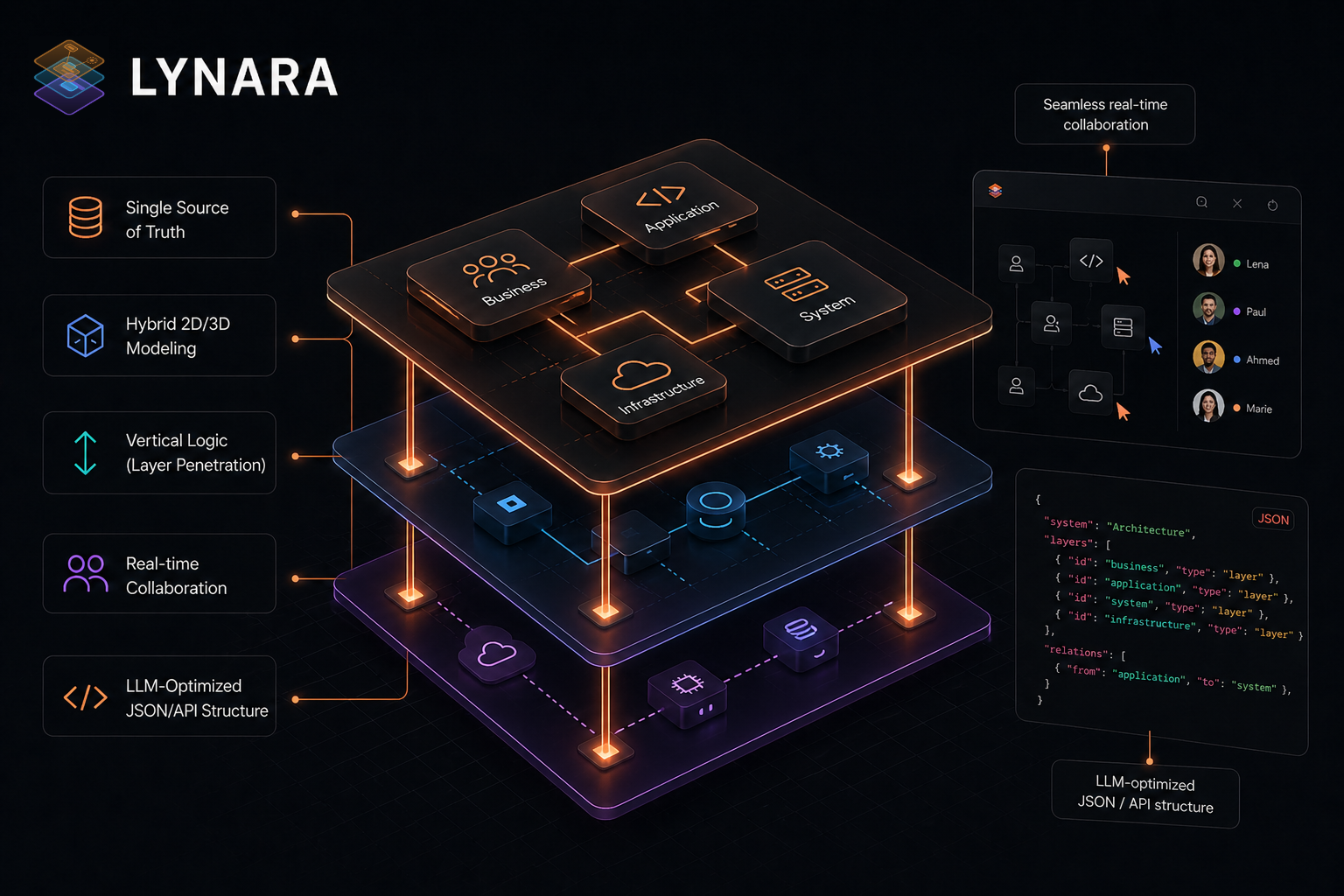
That is the exact situation Lynara set out to remove. In this full Lynara review, we look closely at how this modern software architecture visualization tool rethinks system design around a genuinely multi-layer architecture design paradigm. Whether you are assembling microservices, a modular monolith, or a distributed hybrid server layout, Lynara hands you the means to build tidy, coherent, and durable architecture documentation.
What gives this review an extra layer of interest is that Lynara was born in Switzerland, a country whose reputation for precision engineering and disciplined software craftsmanship precedes it. The real question we want to answer is whether this architecture diagram tool actually earns that reputation.
Why Modern Architecture Design Is So Hard
Before we go any further into this Lynara review, it is worth spelling out why good architecture design carries more weight today than ever:
- Complexity Keeps Climbing: Current applications stretch across multiple services, databases, and infrastructure tiers that are all wired together in intricate ways
- Distributed Teams Need Alignment: Remote and hybrid teams require a clear, shared mental model of the system at every level
- Documentation Rot: Architecture write-ups go stale fast, which breeds knowledge gaps and makes onboarding painful
- Stakeholder Disconnect: Technical and business audiences rarely stay on the same page about system design without strong visualization
- Costly Early Mistakes: Weak initial architecture choices accumulate technical debt that grows expensive to unwind later
This architecture review looks specifically at how Lynara tackles those concerns through its signature multi-layer approach to system architecture design.
The Case for Lynara: A Closer Look
Built by People Who Actually Architect
Lynara came into being because no prior tool could intuitively capture the layered reality of a complex system. As the concept material stresses, where others merely let you draw shapes, Lynara offers a framework that respects the vertical logic of your stack—running from the cloud infrastructure upward to the interface users touch.
The Multi-Layer Design Mindset
The centerpiece of Lynara is a multi-layer design philosophy that reshapes how teams think about and communicate software architecture:
- Clean Layer Separation: Split complex IT systems into logical strata, from UI down through services to the data tier
- Vertical Logic: Traverse layers using layer penetration to see exactly how each one plugs into the next
- Total Visibility: Preserve a complete view across every technical layer in your project
- Scalable Structure: Model architecture that is built to grow rather than painted into a corner
- Explicit Boundaries: Define crisp interfaces between layers to keep everything maintainable
This multi-layer architecture design emphasis is exactly what separates Lynara from the generic diagram crowd. Instead of shoving everything onto a single confusing canvas, it honors the natural hierarchy of contemporary software.
One Single Source of Truth
Where conventional documentation drifts out of date, Lynara steps in as your Single Source of Truth:
- Structured Data: Your architecture is stored as structured, queryable data rather than frozen images
- Machine-Readable: An LLM-Optimized JSON/API structure lets AI tools consume your architecture directly
- Always in Sync: Changes propagate automatically across the whole team in real time
- Version-Control Friendly: Store architecture artifacts right alongside your code
An Interactive Map Canvas
The interactive architecture map canvas is where Lynara shines brightest during this review. In contrast to static diagram tools, the canvas lets you:
- Plan Visually: Arrange your architecture with intuitive drag-and-drop interactions
- Update Live: Watch changes appear instantly across every connected view
- Explore in 3D: See complex software landscapes rendered in 3D for better spatial grasp
- Zoom Seamlessly: Glide between high-level overviews and finely detailed component views
The canvas functions as the central command point for all architecture design activity, so you can probe and adjust system designs without ever losing the overall picture.
Cloud-Native Design Support
For teams shipping modern cloud-native applications, Lynara brings dedicated capabilities:
- Microservices Modeling: Represent intricate microservice architectures with well-defined service boundaries
- Container Awareness: Visualize container relationships and orchestration patterns
- Distributed Mapping: Connect distributed components across a system with clarity
- Hybrid Infrastructure: Design hybrid server concepts that span cloud and on-premises
This architecture platform proves especially valuable for teams invested in Kubernetes, Docker, and the broader cloud-native toolchain.
Core Tool Features
As part of this review, I put the core functionality to the test that makes Lynara a capable system architecture design tool:
Import and Export
A standout capability in this Lynara review is how comprehensively you can move data in and out:
- LLM-Optimized Export: Ship your full system landscape as machine-readable mapping tuned for AI/LLM consumption
- JSON Export: Machine-readable architecture data you can feed into other tools
- LLM-Markdown Export: A human-friendly markdown format suited to documentation
- Mermaid Export: Generate Mermaid diagrams for embedding in markdown
- PNG Export: High-quality images for presentations and sharing
- Tool Migration: Import existing designs from other architecture tools
- Version-Control Friendly: Keep architecture as code-like artifacts
A Productivity-First Design
Lynara comes loaded with keyboard shortcuts that accelerate your workflow:
- Fast Node Creation: Double-press to drop new nodes instantly
- Standard Editing: Familiar shortcuts for copy, paste, undo, and redo
- Smart Navigation: Scroll between layers and use arrow keys for fine positioning
- Multi-Select: Shift-click to grab and manipulate several elements at once
Those shortcuts turn Lynara from a mere drawing surface into a professional-grade architecture design environment.
Integrations and Ecosystem
Lynara's reach extends well beyond the core product through integrations that keep your architecture documentation in step with the tools you already rely on:
Knowledge Base & Documentation Sync
- Embed interactive architecture maps into Confluence, Notion, and Google Workspace
- Keep written documentation in automatic sync with live architecture designs
- Do away with stale technical documentation for good
Development & DevOps Integration
- Connect straight to GitHub, GitLab, and Bitbucket repositories
- Automatically sync services, repositories, and CI/CD pipelines
- Visualize your whole development infrastructure dynamically
- Watch pull requests, commits, and codebase architecture in real time
Enterprise Authentication
- Support for Google Workspace, GitHub, and Microsoft SSO
- Streamlined single sign-on for frictionless team access
- Enterprise-grade security through familiar login methods
This ecosystem strategy turns Lynara into the central hub for architecture documentation while it plugs into the exact tools your team already uses every day.
A Browser-Based Platform
One of the most practical traits of this software architecture platform is how accessible it is:
- No Installation Needed: Runs instantly in your browser
- Cross-Platform: Works from any device with a modern browser
- Real-Time Collaboration: Multiple team members can work together at the same time
- Always Current: No worrying about version mismatches or manual updates
This SaaS approach lets you begin designing right away, with no IT setup or local software to install.
Who Should Reach for Lynara?
Based on a thorough review, Lynara suits several distinct audiences:
Software Architects & System Designers
If your days are spent shaping complex systems, Lynara hands you the clarity you need:
- Create precise multi-layer system designs
- Document architecture decisions cleanly
- Communicate designs effectively to stakeholders
- Maintain living architecture documentation
Development Teams
Development teams benefit from a shared understanding:
- Align on system structure before any code is written
- Onboard new members quickly with clear visuals
- Track how the architecture evolves over time
- Reduce misunderstandings during implementation
Technical Leads & Engineering Managers
Leaders must juggle technical and strategic concerns:
- Make architecture decisions visible to leadership
- Plan for scalability and future expansion
- Coordinate across multiple sub-teams
- Demonstrate architectural thinking to stakeholders
Enterprise Architecture Teams
Large organizations face unique demands that Lynara addresses:
- Enterprise-wide architecture standardization
- Compliance documentation requirements
- Legacy system integration planning
- Multi-team collaboration at scale
Pricing Plans: A Detailed Look
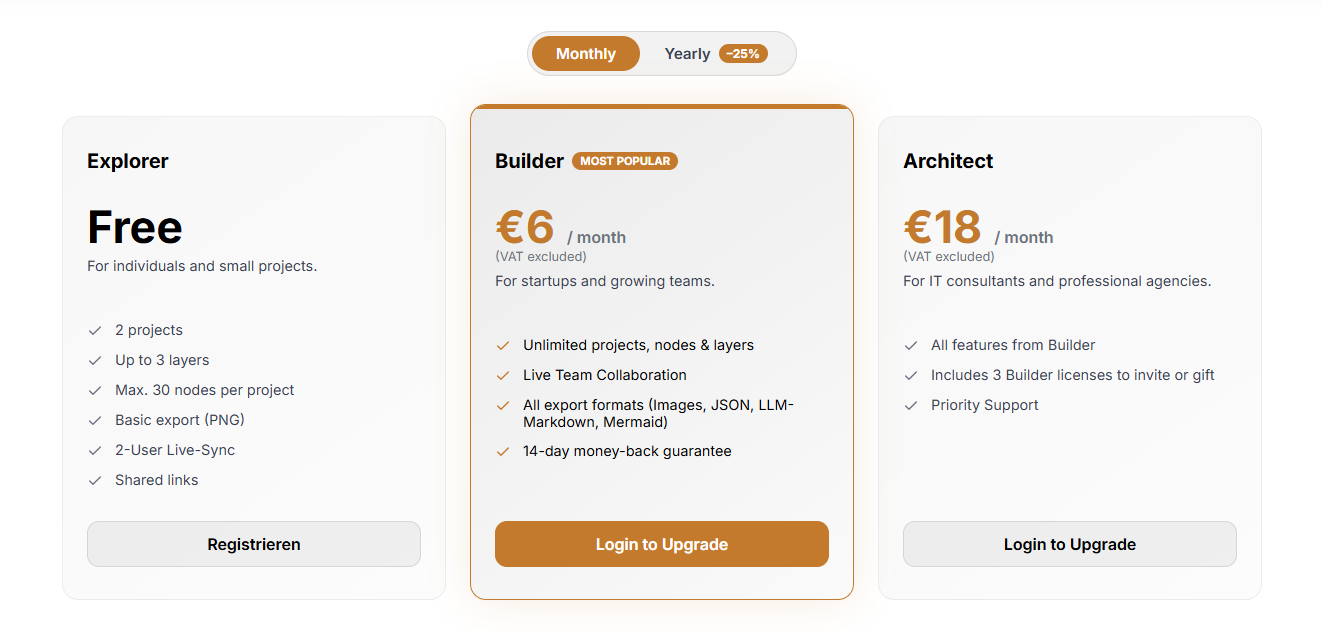
This Lynara review found the platform keeps pricing straightforward and transparent, with options spanning individual developers to entire enterprises:
Explorer (Free) - Great for Getting Started
The free plan is genuinely useful for learning and modest projects:
- 2 projects: Manage more than one architecture design
- Up to 3 layers: Essential multi-layer support
- Max. 30 nodes per project: Enough for focused system components
- Basic export (PNG): Export static images
- 2-User Live-Sync: Collaborate with a single teammate
- Shared links: Share your work without fuss
This free architecture design tier is perfect for evaluating Lynara and building your first projects with zero financial commitment.
Builder (€6/month) - The Most Popular Option
At just €6 per month (with a 25% annual discount available), the Builder plan unlocks professional features:
- Unlimited projects, nodes & layers: No restriction on complexity
- Live Team Collaboration: Work simultaneously with your whole team
- All export formats: Images, JSON, LLM-Markdown, Mermaid diagrams
- 14-day money-back guarantee: A risk-free trial
This tier suits startups and growing development teams that want full access to Lynara's capabilities.
Architect (€18/month) - For Professional Consultants
The Architect plan builds on Builder with extra licensing:
- Everything in Builder: Full feature access
- Includes 3 Builder licenses: Invite team members or gift to clients
- Priority Support: Faster turnaround when issues arise
This tier is aimed at IT consultants and professional agencies juggling multiple client projects.
Universities & Schools (Free)
Lynara also offers a free plan for students and educators:
- Free for academic use: Requires verification via a university or school email
- All Builder features: Unlimited projects, nodes, layers, and full export formats
- Covering 2000+ institutions: Available to students and educators worldwide
This initiative supports the next generation of software architects as they learn modern architecture design.
Multi-Layer Architecture, Explained Simply
For anyone new to multi-layer architecture design, Lynara's approach typically breaks down like this:
User Interface Layer
The topmost layer where users interact with your application:
- Web interfaces
- Mobile apps
- API gateways
- Client-side components
Services Layer
The business logic and processing tier:
- Microservices
- Serverless functions
- Business logic components
- Integration services
Data Layer
Where information lives and is managed:
- Databases (SQL/NoSQL)
- Data warehouses
- Caching systems
- File storage
Infrastructure Layer
The foundational layer underpinning everything above:
- Cloud services
- Container orchestration
- Networking
- Security infrastructure
That separation lets teams work on individual layers without disturbing the others, making system evolution far more manageable.
Lynara in Comparison
Why Lynara Sets a New Bar
Drawing on Lynara's concept page, here is how they line up against the standard architecture documentation approach:
| Aspect | Status Quo | Lynara Platform |
|---|---|---|
| Tools & Documentation | Chaos of tools & outdated wikis | Single Source of Truth |
| Data Format | Images (PNGs) instead of structured data | Hybrid 2D/3D system modeling |
| Thinking Approach | Horizontal thinking (just diagrams) | Vertical Logic (Layer Penetration) |
| Updates | Tedious, manual updates | Seamless real-time collaboration |
| AI Compatibility | No AI-readability of the architecture | LLM-Optimized JSON/API Structure |
This architecture review confirms that Lynara represents a genuine shift from static diagrams toward dynamic, machine-readable architecture documentation.
What Makes Lynara Unique
This architecture platform review surfaced several distinctive qualities:
- Authentic Multi-Layer Framework: Built from the ground up for multi-layer thinking, not retrofitted onto flat diagrams
- Swiss Precision: The attention to detail reflects Swiss engineering values
- Modern Tech Stack: Browser-based with contemporary design principles
- Developer-Friendly: Keyboard shortcuts and efficient workflows
- Future-Proof Design: Native support for cloud-native, microservices, and distributed systems
Real-World Applications
Based on this Lynara review, here are some practical use cases:
Startup Product Development
- Design the initial system architecture before coding begins
- Communicate the technical vision to investors
- Plan for scale from day one
- Document decisions for future reference
Enterprise Digital Transformation
- Map legacy system modernization
- Design cloud migration strategies
- Standardize architecture across departments
- Create compliance documentation
Consulting Engagements
- Deliver architecture documentation to clients
- Visualize existing system landscapes
- Plan integration architectures
- Guide technical decision-making
Open Source Projects
- Document project architecture for contributors
- Onboard new maintainers quickly
- Visualize component relationships
- Plan feature architecture
Security, Privacy, and the Swiss Advantage
For enterprise users guarding sensitive architecture data, Lynara delivers through secure browser-based infrastructure and a privacy-focused design. As a Switzerland-based platform, it follows European privacy standards and carries the Swiss engineering precision known for quality and reliability. The platform pairs clear data-handling policies with the dependable, innovative software ethos Switzerland is known for.
Conclusion: The Final Verdict
After extended testing and analysis, this Lynara review concludes that it is a compelling pick for teams in search of a modern software architecture visualization tool. The multi-layer architecture design approach is genuinely novel, offering a clarity that conventional diagram tools simply cannot reproduce.
Review Summary
- Architecture Design: ⭐⭐⭐⭐⭐ (5/5)
- User Experience: ⭐⭐⭐⭐½ (4.5/5)
- Feature Set: ⭐⭐⭐⭐⭐ (5/5)
- Collaboration: ⭐⭐⭐⭐⭐ (5/5)
- Value for Money: ⭐⭐⭐⭐⭐ (5/5)
- Overall Review Score: ⭐⭐⭐⭐⭐ (4.8/5)
Key Takeaways
Lynara excels at:
- Multi-layer architecture visualization
- Complex system documentation
- Team collaboration on architecture
- Cloud-native and microservices design
- Browser-based accessibility
Consider alternatives if you need:
- Extremely simple diagrams
- Desktop-only solutions
- Deep UML compliance
Final Thoughts
For software architects, development teams, and technical leaders seeking a modern system architecture design tool, Lynara delivers on its promise of precise multi-layer system design. The browser-based platform, combined with thoughtful touches like keyboard shortcuts and broad import/export support, makes it practical for real-world use.
The multi-layer approach is not marketing spin—it is a fundamental shift in how we conceive of and communicate software architecture. Whether you are modeling microservices, planning a cloud migration, or documenting an existing system, Lynara offers the clarity and structure that modern software development demands.
Experience the difference. Get started for free with no strings attached – no credit card, just architecture.
Ready to transform your architecture design workflow? 👉 Start Designing with Lynara today and see how precise multi-layer system design can revolutionize how your team approaches software architecture.
Tags
# Review# Lynara# software architecture visualization tool# system architecture design tool# architecture diagram tool# software architecture platform# Multi-layer architecture design# Cloud-native architecture# Microservices architecture# Architecture mapping# Interactive architecture canvas# System design visualization# Enterprise architecture# Architecture documentation# LLM-optimized export# Mermaid diagram export# Team collaborationNabbed Review - Career CRM for Revenue Professionals Treating Job Search Like Sales
About Us
Follow for new blogs
Subscribe to our blog
Subscribe to Newsletter
Subscribe to our newsletter to get the best products weekly.